AI dispatch automation

Dispatch that keeps moving after the office closes.

Benri builds dispatch automation for field teams that need faster triage, clearer routing, technician escalation, customer updates, and live visibility into open work.

Free. 30 minutes. No payment until we agree on scope.

What this service should create

Urgent requests classified and escalated faster

Technicians routed by on-call rules, service type, territory, or severity

Customers receive clearer status updates

Owners see open, accepted, escalated, and resolved jobs

Dispatch surface

Requests become an escalation queue.

Dispatch automation should show urgency, owner, route, acceptance, and resolution without relying on a morning reconstruction.

Intake

Job request enters once

Call, QR report, form, or text creates a structured request.

Open

Route

Technician or owner gets paged

Territory, urgency, availability, and waterfall rules decide the handoff.

Paged

Visibility

Accepted, escalated, or resolved

The owner sees the status of every live request.

Visible

See it running

Shapes that fit this work.

Interactive demos and live builds tied to this service. Each one is a real working surface — yours would be tailored to your workflow, tools, and review rules.

View proof hub
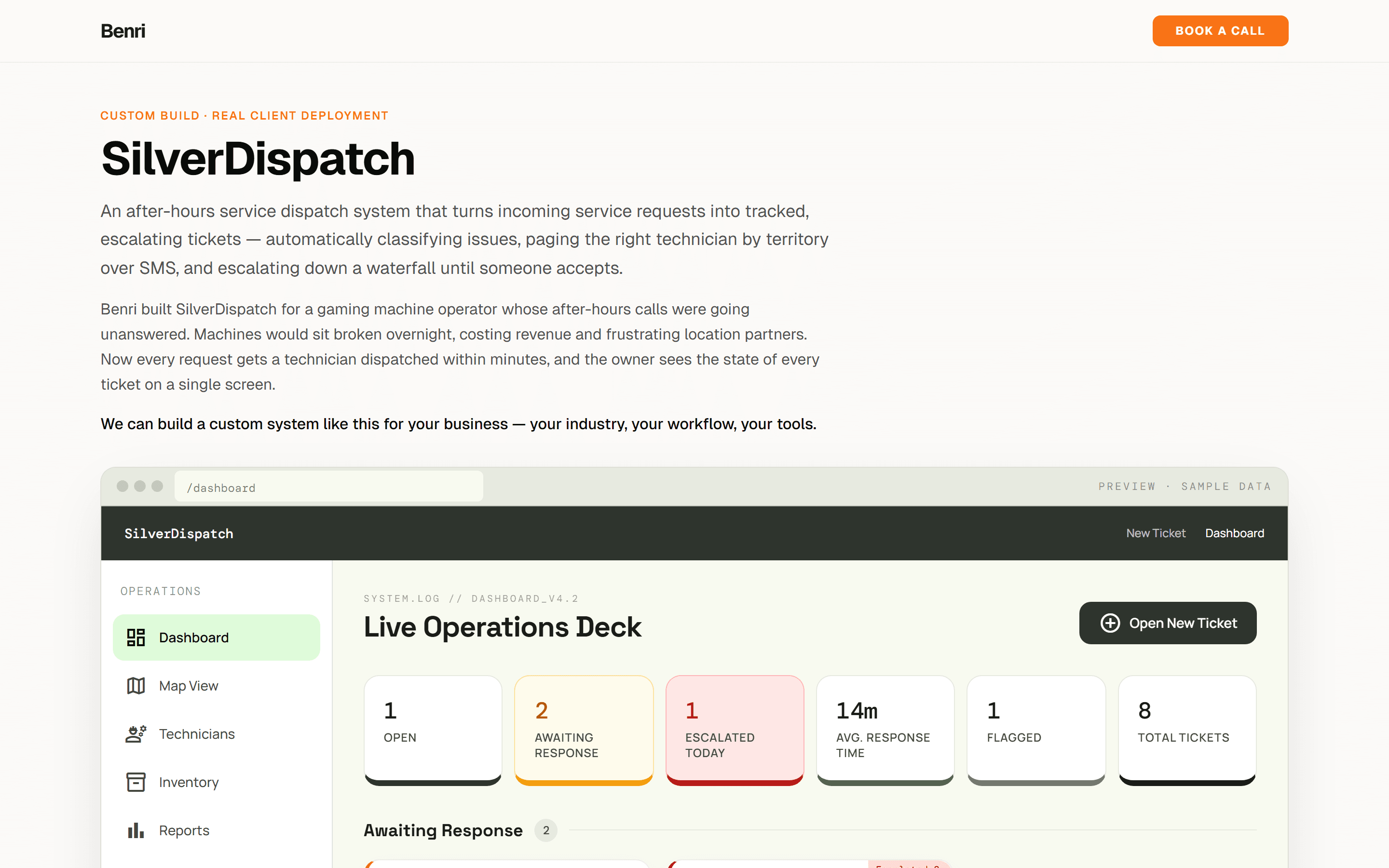
SilverDispatch dispatch dashboard

SilverDispatch

POC

After-hours dispatch and service ticketing for an operator that needed every request turned into a tracked, escalating job.

Request intake and issue classification
Technician routing and SMS escalation
Dashboard for open, accepted, escalated, and resolved work
PythonFastAPITwilioSupabase
JobLine

Concept demo

Customer-visible job tracker for service businesses. Operator dashboard on one side, customer phone view on the other, across four trades.

Schedules + dispatches from a single calendar view
Progress photos and chat threaded into one customer-facing link
Status timeline auto-fills as the tech advances through milestones
Next.jsReactTypeScriptVercel
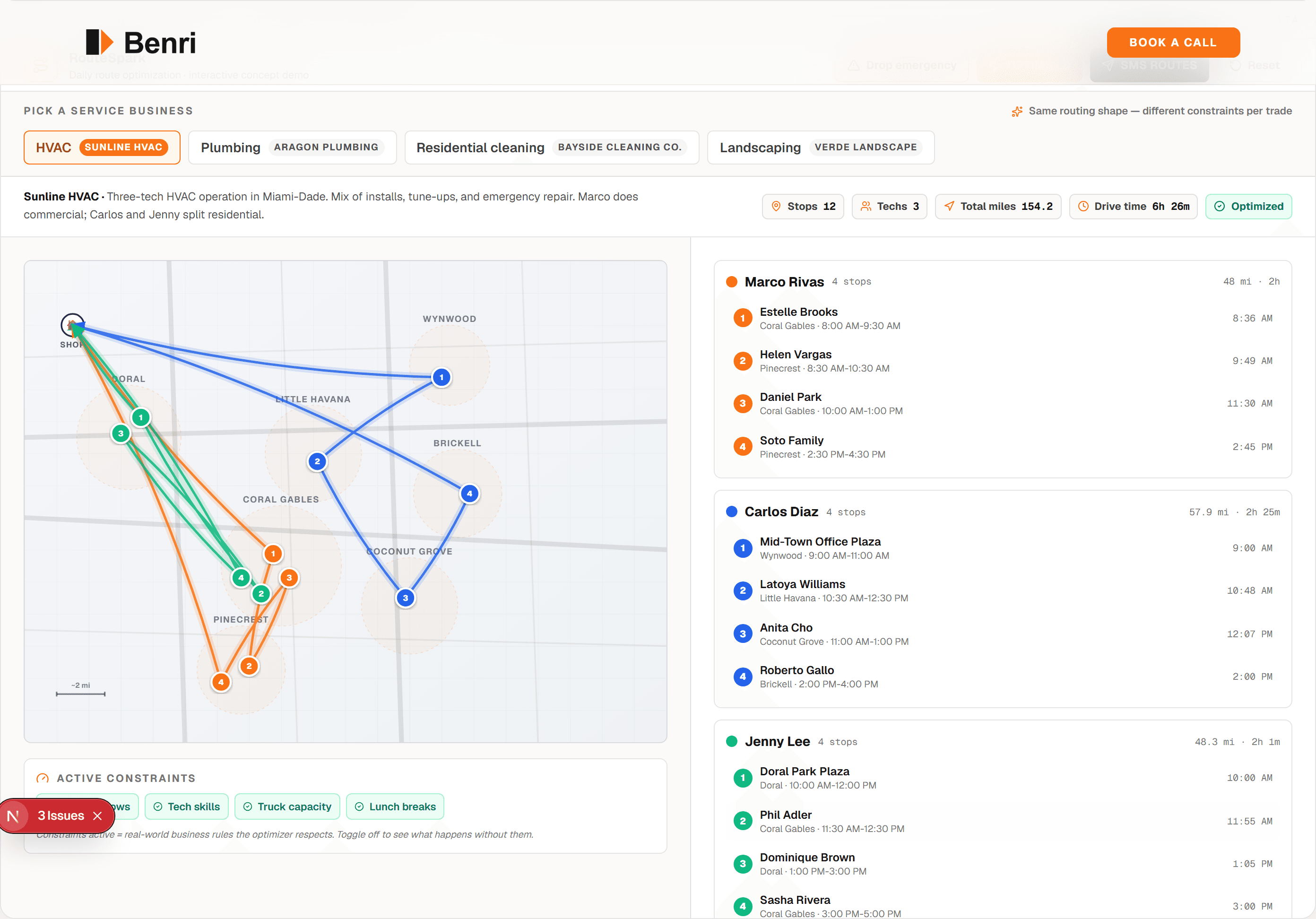
RouteSpark day plan with map view and per-tech route lines

RouteSpark

Concept demo

Today's stops + tech roster, optimized respecting time windows, skills, and capacity. SMS routes to the field in one click.

Schematic map with stops, techs, and animated route lines
Constraint toggles (time windows, skills, capacity, lunch) really recompute the route
Click-to-reassign overrides + SMS-the-day-to-techs handoff
Next.jsReactTypeScriptVercel

Starter build preview

A dispatch board for requests that cannot wait.

Dispatch automation should make the next move obvious: who owns the request, what priority it has, who has accepted it, and what still needs attention.

HVACField serviceProperty management

Signal

Urgent requests get mixed with routine work

Signal

Technician acknowledgement is hard to track

Signal

Owners lack a clear view of open, escalated, and unresolved jobs

Intake to handoff

Field-ready

Triage

Request type, urgency, location, and customer context are captured

Escalate

SMS or task routing follows the on-call and severity rules

Track

Open, accepted, missed, and resolved jobs are visible

Operating lanes

Each lane needs a clear handoff.

Built for work that enters fast, changes status, and needs the right person to know what happened next.

Request triage

Classify service requests by urgency, customer, location, service type, and required response path.

Technician routing

Route jobs by schedule, territory, on-call rotation, service category, customer priority, or SLA rule.

SMS escalation

Alert on-call staff, collect accept/decline responses, and escalate when a job is not acknowledged.

Operations visibility

Track open, accepted, delayed, escalated, completed, and unresolved work in a clean operational view.

The first build

Start with the dispatch moment that creates the most chaos.

Dispatch automation works best when the rules are clear and the cost of delay is obvious. The first build should focus on one request type or coverage window.

First build

After-hours emergency intake

First build

On-call technician routing

First build

Accepted and missed-job escalation

First build

Customer status updates

First build

Work order creation and cleanup

First build

Open-job and aging-job dashboards

Your stack stays useful

Dispatch should meet the field where the field already works.

Benri connects calls, texts, calendars, dispatch tools, ticket queues, maps, and owner dashboards around the workflow.

Tools Benri connects to

Field systems

ServiceTitanJobberHousecall Pro

Tools Benri can extend

Communication

TwilioSMSGmail

Tools Benri can replace with custom software

Operations data

AirtableGoogle SheetsMaps

Dispatch rules have to match the way the business actually runs.

Benri maps your real dispatch rules before building: severity, territory, on-call coverage, customer promises, technician availability, and escalation timing.

AI helps understand messy call language and summarize job context. Plain automation handles routing, alerts, status changes, acknowledgments, and dashboards.

Proof fit

Proof should match the workflow.

Benri only shows proof here when the build actually relates to this service. Otherwise, the service page keeps a placeholder until a better demo or case study is ready.

Relevant proof

SilverDispatch

POC / dispatch workflow

SilverDispatch is the clearest proof for dispatch automation: intake, routing, SMS escalation, and one dashboard for open work.

Open proof

Questions

The service should be understandable before the sales call.

Can dispatch automation handle emergencies?

It can triage and escalate emergencies, but the rules need to be explicit and the human path needs to be reliable.

Can technicians accept jobs by text?

Yes. SMS accept/decline flows and missed-acknowledgment escalation are common dispatch workflows.

Does this replace dispatch software?

Usually no. Benri often builds the handoff layer around your dispatch system, phone, SMS, and status reporting.

Can owners see what happened overnight?

Yes. Open, accepted, escalated, and resolved work can be summarized into a live view or morning report.

Start with the audit

Bring the workflow. We will tell you what service fits.

Thirty minutes. We will map what is worth automating, what needs human review, and what should go first.

Map a dispatch workflow

Free. 30 minutes. No payment until we agree on scope.